Understanding Rendering
Rendering determines what Google actually sees on your pages — not what you see in your browser. Many SEO problems invisible in Chrome are rendering failures Googlebot encounters.
What you'll learn
- Understand the difference between raw HTML and rendered DOM
- Learn how Googlebot renders JavaScript and why it matters
- Know how to verify what Google actually sees on a page
- Understand the two-wave indexing system for JavaScript content
- Identify common rendering failures that cause SEO problems
What Rendering Means in SEO
When Googlebot visits a page, it receives raw HTML from the server. For simple static pages, that HTML contains all the content. But for modern JavaScript-heavy sites, the raw HTML may be mostly empty — the actual content is injected into the DOM by JavaScript after the page loads.
Rendering is the process of executing JavaScript and building the final DOM. What you see in your browser is the rendered page. What Googlebot first receives is the raw HTML — and if critical content only exists in the rendered DOM, Googlebot may not see it during its initial crawl.
How a Browser Actually Draws a Page
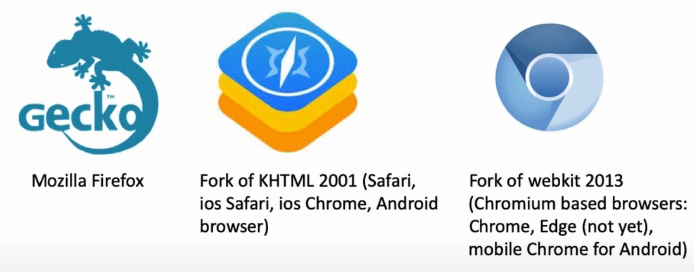
Every browser has an engine — a program that knows how to turn a response from the server into pixels on the screen. Chrome and Edge share the Blink/Chromium engine, Firefox uses Gecko, and Safari uses WebKit. The pipeline is the same conceptually across all of them, and it's worth knowing in enough detail to hold a technical conversation with a client's developer.
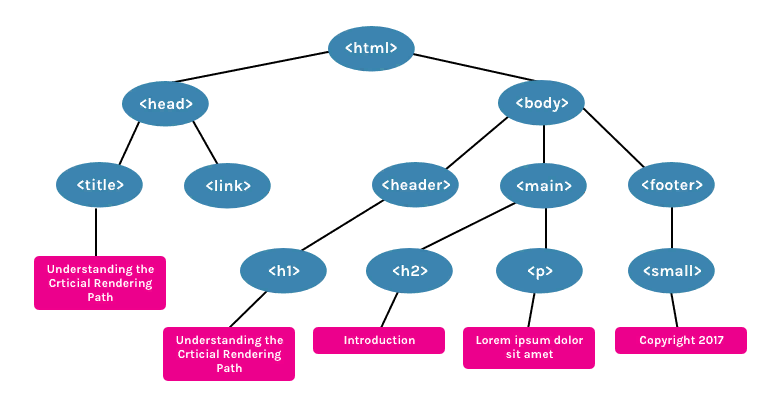
The pipeline runs: Bytes → Characters → Tokens → Nodes → DOM. The browser downloads the HTML as bytes, decodes them into characters, groups characters into tokens (like <a> and </a>), turns tokens into node objects with properties, and finally links the nodes into a tree — the DOM (Document Object Model). HTML has one advantage here: it can be processed incrementally, so content can start appearing before the whole document has downloaded. CSS and JavaScript don't get that luxury.
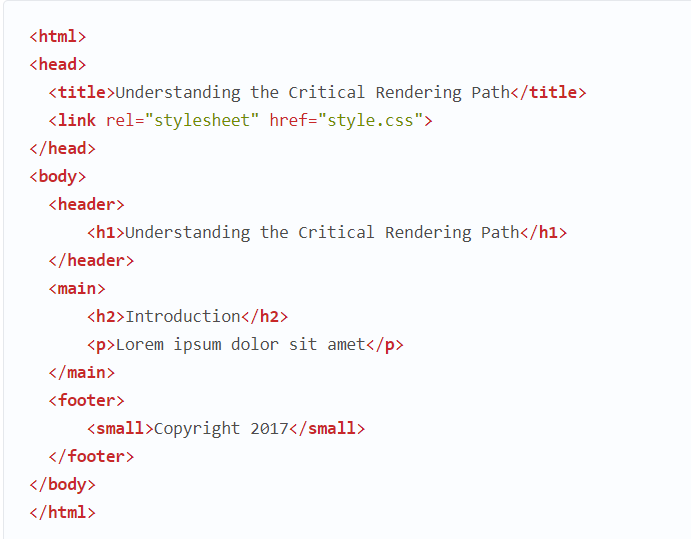
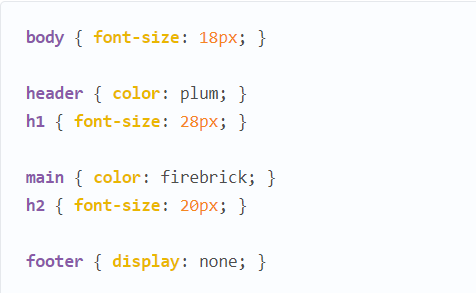
When the browser hits a <link> tag, it starts downloading the referenced CSS file and runs it through the same kind of pipeline to build the CSSOM (CSS Object Model). Unlike HTML, CSS cannot be applied incrementally — later rules can override earlier ones, so the browser must fully parse the stylesheet before it can safely apply any of it. That's why CSS is called a "render-blocking resource": the render tree can't be built until CSSOM parsing finishes. (A stylesheet loaded with a media attribute that doesn't match the current viewport, e.g. orientation:landscape while the page is viewed in portrait, isn't render-blocking.) CSS is also "script-blocking," because JavaScript execution has to wait for CSSOM to finish building.
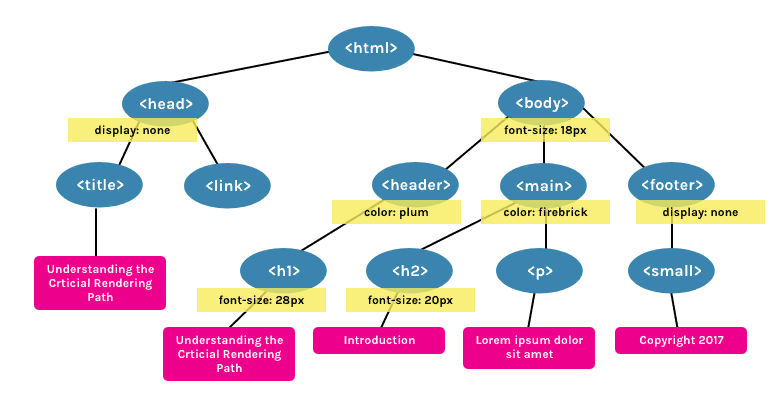
JavaScript is a blocking resource for the parser too: when the browser hits a <script> tag (inline or external), DOM construction pauses until the script downloads (if external) and runs. A script in the <head> or mid-page therefore delays the whole page's first paint — which is why render-critical scripts are usually placed just before </body>, or given an async attribute so the script downloads in parallel without blocking DOM/CSSOM construction.
DOM + CSSOM = Render Tree → Layout → Paint
Combine the DOM and the CSSOM and you get the Render Tree — but only the parts of the DOM that are actually visible. A node with display:none exists in the DOM but is excluded from the render tree entirely (this matters directly for SEO: hidden keyword-stuffed blocks are a classic audit finding).
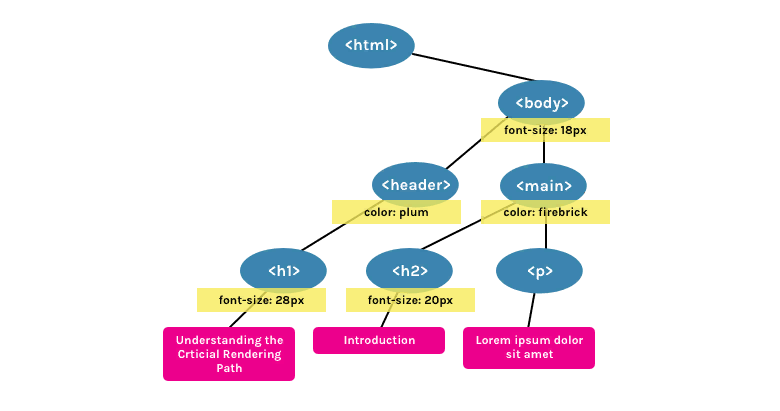
display:none.After the render tree, the engine runs Layout (calculating the exact position and size of every box, driven by the viewport size set via the <meta name="viewport"> tag — 980px wide by default if that tag is missing), then Paint (converting the visible content into actual pixels — complex effects like gradients cost more than a flat color). A later DOM/CSS change that affects layout triggers a reflow/relayout (recalculating positions); a change that doesn't affect layout, like a color change, triggers a cheaper repaint instead. The whole chain — DOM → CSSOM → JS execution → render tree → layout → paint — is called the Critical Rendering Path (CRP), and it's visible directly in Chrome DevTools' Performance panel as a sequence of "Send Request," "Parse HTML," "Parse Stylesheet," "Evaluate Script," "Layout," and "Paint" events.
Google's Two-Wave Indexing
Googlebot processes pages in two waves:
- Wave 1: Raw HTML — Googlebot fetches the page and processes the raw HTML immediately. Content visible in the raw HTML is indexed right away.
- Wave 2: Rendered content — Days to weeks later, Googlebot returns to render the JavaScript and index content that only exists in the rendered DOM. This delay can mean new content takes weeks to appear in search results.
This two-wave system means that JavaScript-rendered content is indexed eventually — but slower than server-rendered content. For time-sensitive pages, SEO-critical content should be in the raw HTML, not only in the rendered DOM.
Googlebot's own pipeline (its headless-Chromium renderer) formalizes this: a URL comes out of the crawl queue, Googlebot fetches the raw HTML (checking robots.txt first — if the URL is disallowed, no request is even sent), links found in that raw HTML go back into the crawl queue (wave 1), and the page separately enters a render queue. When rendering resources are available — this can take anywhere from a few seconds to a much longer wait — Google's renderer executes the JavaScript, hands the fully rendered HTML back to indexing (wave 2), and any newly discovered links go back into the crawl queue again. Google's own guidance: prefer server-side rendering or pre-rendering where possible, both because it's faster and because not every bot can execute JavaScript at all.
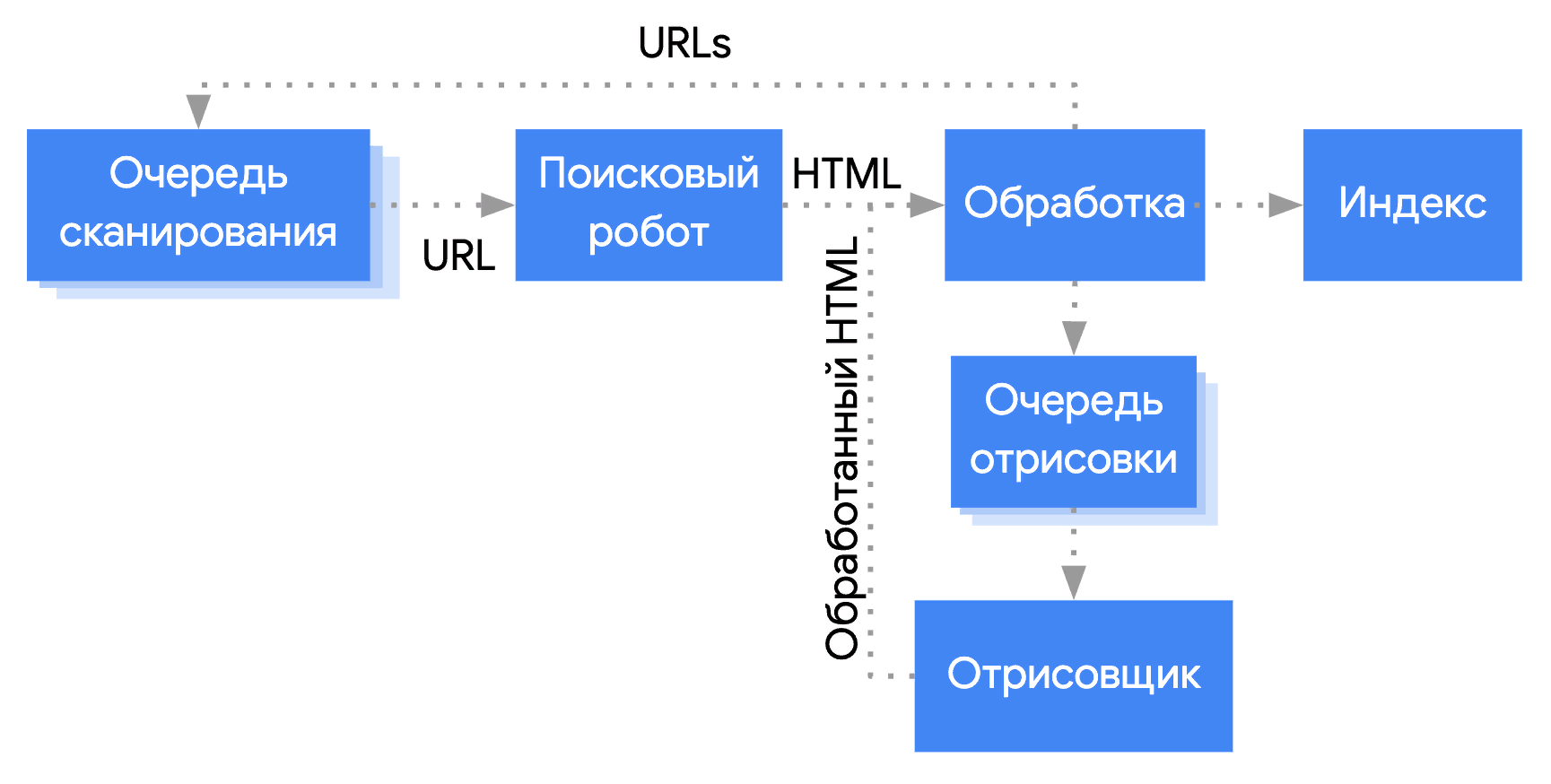
A few operational details worth knowing: Googlebot generally won't request a given page more than roughly once every few seconds, and budgets about 6 seconds of crawl time per page. It crawls from US IP ranges by default (falling back to other regions if it detects a block), prefers HTTP/2 when a site supports it, and only crawls the first 15MB of an HTML or text file — content past that point is never seen. Because other crawlers frequently spoof the Googlebot user-agent string, verifying a suspicious visitor is really Google requires a reverse DNS lookup on the source IP, or matching it against Google's published Googlebot IP ranges — never trust the user-agent string alone.
Server-Side vs. Client-Side vs. Pre-Rendering
A quick shared vocabulary, since these terms get used loosely: SSR (server-side rendering) builds the HTML on the server per request. CSR (client-side rendering) builds it in the browser via JavaScript after an almost-empty HTML shell arrives. Rehydration is JavaScript "waking up" server-rendered markup on the client so it reuses the existing DOM and data instead of rebuilding from scratch. Pre-rendering runs the client app at build time and saves its initial state as static HTML.
A traditional site re-requests and re-renders the full HTML from the server on every navigation — simple, but repeats work the server already did moments earlier. A SPA (Single-Page Application) loads one JavaScript bundle up front, then fetches only data (via AJAX/JSON) for each subsequent view, updating the DOM in place without a full reload — faster to navigate, but the initial "View Source" shows almost nothing, since the real content is assembled client-side. Angular and React are the most common frameworks and tend to give the fewest indexing problems when configured correctly; other popular options include Vue, Ember, Backbone, and Svelte.
- Plain SSR — the server builds full HTML per request from a database/API + templates. Simple, but every request pays a generation cost (mitigated with caching or a CDN in front of the dynamic origin).
- Static SSR (SSG) — HTML is generated once at build time (tools like 11ty or Jekyll) and served as-is from a CDN. Extremely fast, but not well suited to highly dynamic, per-user content.
- SSR with rehydration (isomorphic JS) — the server pre-renders the page, then the full client app loads and "rehydrates" it (Vue, React, Nuxt, Gatsby, Svelte). Good user experience when done well, but the more JavaScript needed to rehydrate, the longer the page looks ready before it actually is.
- Pure CSR — the server returns a near-empty HTML shell and a JS bundle; the user sees nothing until the bundle finishes executing. First-byte time is meaningless here.
- CSR with pre-rendering — the server serves a static "skeleton" (often gray placeholder boxes) for a fast-but-meaningless first paint, while the real app still has to load before anything is usable.
ChatGPT's crawler, Perplexity's bot, and most LLM training crawlers do not execute JavaScript. Content that only exists in the rendered DOM is completely invisible to these systems. For GEO optimization, all important content must be server-rendered or pre-rendered.
How to Check What Google Sees
The most reliable method for rendering verification uses two tools in combination: GSC URL Inspection and Notepad++ with the Compare plugin. Pick a handful of important page types first — homepage, a product/listing page, a category page — rather than trying to check everything.
Step 1: In Google Search Console, open URL Inspection and enter the URL. Click "Test Live URL," then "View Tested Page" → select the "HTML" tab. This shows the rendered HTML that Googlebot sees. Copy it.

Step 2: Open the same URL in your browser, right-click → View Page Source (or press Ctrl/Cmd+U). This shows the raw HTML the server sent, before any JavaScript ran. Copy it. Separately, open DevTools (F12) → Elements panel to see the fully rendered DOM, for a quick visual comparison.
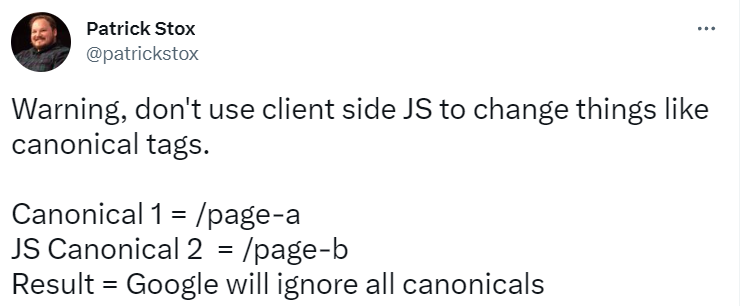
Step 3: Open both versions as two files in Notepad++, install the Compare plugin, and run Plugins → Compare → Compare. Don't just diff the code — also read through both versions by eye. The diff shows every difference between raw and rendered HTML; anything present only in the rendered version was added by JavaScript and may be slower to index. Watch specifically for a canonical tag that gets swapped or removed by JavaScript — Googlebot only trusts the canonical it finds in the raw HTML, so a JS-set canonical is silently ignored.
Checking the Search Engine's Cached Version
Separately from URL Inspection, find the engine's cached rendering of the page in the search results and compare it — visually and in code — against what your own browser shows. Pay attention to anything missing from the cached version: that's often a sign of a slow-loading resource that didn't finish in time for the crawler.
Checking Rendering Across Browsers
Check Google Analytics under Technology → Browser & OS to see which browsers your actual visitors use, then test the site's layout and script/style loading in those browsers via BrowserStack. Pay particular attention to the Edge share: some older asset formats (fonts, images, video codecs) aren't supported by every Edge version, and if a meaningful share of traffic is on Edge, the client's dev team may need to add fallback formats or exceptions.
Checking Lazy-Loaded Images
Two ways to verify lazy-loaded images are actually visible to Google. Method 1 (no code): in GSC's URL Inspection, open "Page resources," filter to both loaded and failed-to-load resources, and search the resource log for the image filenames you care about (found via View Source or DevTools). If an image you expect to matter isn't in that log, Google isn't seeing it and the lazy-load implementation needs fixing. Method 2 (technical): a Puppeteer script (node lazyimages_without_scroll_events.js -u https://site.com/page) renders the page with and without simulated scrolling and screenshots both — anything missing from the "no scroll" side is invisible to Googlebot.
The single most common lazy-load bug: an <img> tag using only data-src (the real image URL) with no src attribute at all, or a 1×1 placeholder in src that JavaScript swaps for the real image on scroll. Both src and data-src should be present, with src holding a real (if lower-priority) version of the image — never leave it empty or a placeholder pixel.
If You Find Rendering Errors
Consult the group lead before recommending a fix. For serious rendering problems, the standard recommendation is Prerender.io — inexpensive, and its render timeout is far more generous than Google's own, so even slow lazy-loaded content has time to finish. Don't suggest the client fix this in-house; in practice a prerendering service resolves most cases faster and more reliably. For a narrower problem — e.g. lazy-loading that only affects images — recommending a swap to a better-supported lazy-load library is often enough.
Common Rendering Failures
The most frequent rendering problems found during technical audits:
- H1 tag rendered by JavaScript — the page appears to have an H1 in the browser, but the raw HTML has no H1. Google may not associate the page with its intended topic.
- Canonical tag set via JavaScript — Googlebot reads the raw HTML canonical, not the JS-rendered one. If the canonical is JS-set, Googlebot may index the wrong URL version.
- Schema markup injected via JS — structured data only in the rendered DOM may not be processed by Google's structured data parser, which runs on raw HTML.
- Internal links in JavaScript — if navigation links are rendered by JS, Googlebot may not discover linked pages during its raw-HTML crawl pass.
Key Takeaways
- A browser's rendering pipeline runs Bytes → DOM, and separately CSS → CSSOM; DOM + CSSOM = Render Tree → Layout → Paint, and that whole chain is the Critical Rendering Path
- Googlebot processes pages in two waves: raw HTML first (immediate), JavaScript rendering — via its own crawl-queue/render-queue pipeline — days to weeks later
- AI crawlers (ChatGPT, Perplexity) don't render JavaScript — content only in the DOM is invisible to them
- Use GSC URL Inspection + Compare plugin to find exactly what Googlebot sees vs. raw source, and check the engine's cached version, cross-browser rendering, and lazy-loaded images separately
- Critical SEO elements (H1, canonical, schema, key internal links) must be in raw HTML, not JS-rendered — a JS-set canonical is silently ignored by Google
- JavaScript-dependent pages are indexed eventually by Google, but weeks slower than server-rendered content; for serious cases, Prerender.io is the standard recommendation